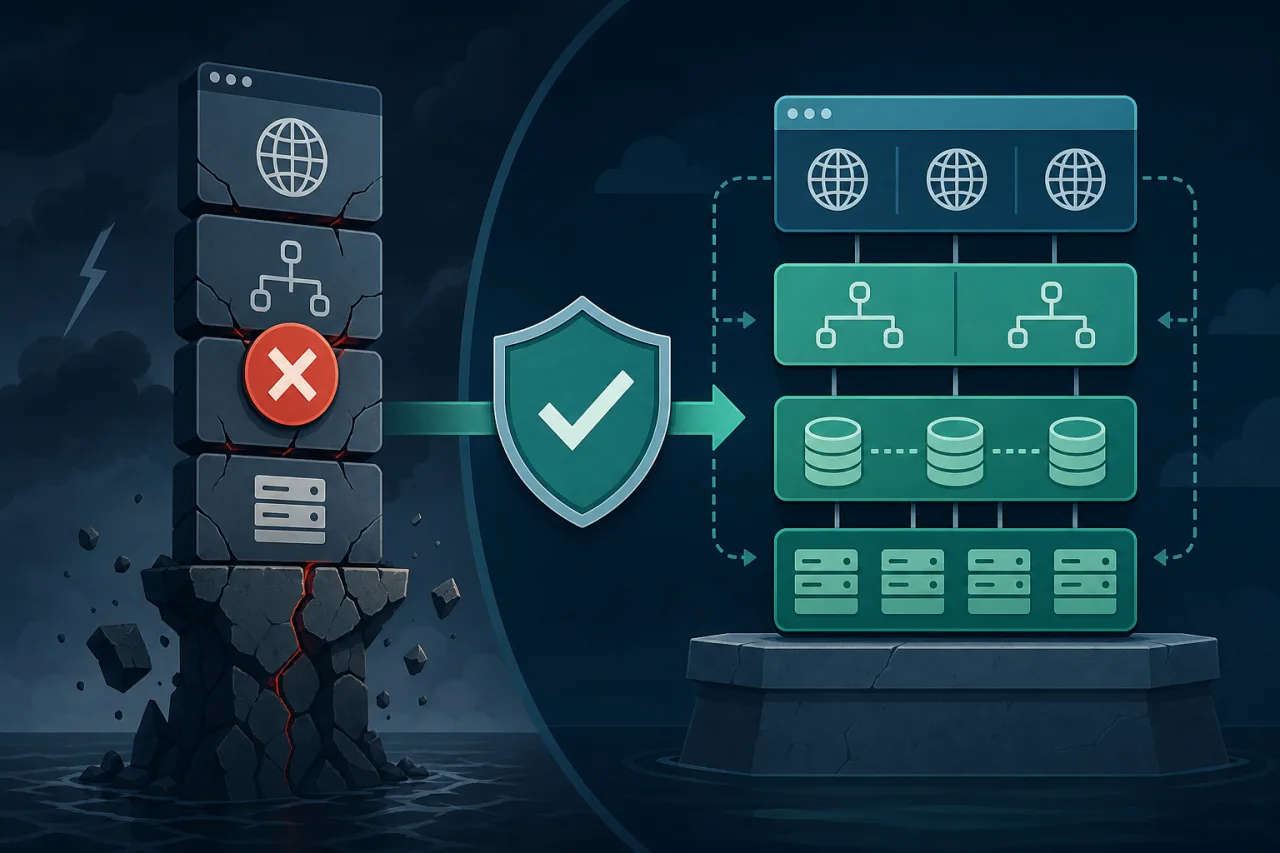
What Is a Single Point of Failure?
A single point of failure (SPOF) is any component whose failure brings down the entire system. The tricky part isn't understanding the definition — it's finding every place one is hiding in your stack before your users find it for you.
This post walks through the most common SPOF locations in a typical web architecture and the concrete steps to remove them.
Layer 1: DNS
DNS is the first place most teams forget to harden. If your domain resolves through a single DNS provider and that provider has an outage, your site is unreachable regardless of how resilient your infrastructure is behind it.
What to do:
- Use a DNS provider that runs a globally anycast network with multiple independent resolver clusters.
- Configure secondary DNS with a second provider. Both major providers (Route 53, Cloudflare, NS1, etc.) support being used as secondary via AXFR/NOTIFY zone transfers.
- Keep TTLs reasonably low (300–600 seconds) on records you may need to change quickly during an incident.
Multi-region uptime monitors that check from several geographic locations can tell you whether a DNS resolution failure is local or global — useful triage signal in the first five minutes of an incident.
Layer 2: Load Balancers
A single load balancer instance is itself a SPOF. Most managed load balancer services (AWS ALB, GCP Load Balancing, Azure Front Door) abstract this away by running redundant instances under the hood. If you're running your own HAProxy or Nginx load balancer on a single VM, you need to address this.
Steps to eliminate the load balancer SPOF:
- Run two (or more) load balancer instances.
- Use a floating IP (e.g., AWS Elastic IP reassignment, Keepalived with VRRP on bare metal) so failover is automatic.
- Health-check your load balancers from outside your network — not just from within it.
Layer 3: Application Servers
This layer is usually the easiest to fix because horizontal scaling is well-understood. Run multiple application server instances behind your load balancer, and ensure none of them holds exclusive local state.
Common mistakes here:
- Storing sessions in local memory or on the local filesystem instead of a shared store (Redis, a database).
- Hardcoding a specific server hostname in internal service calls.
- Running cron jobs or background workers on only one app server with no failover.
For background jobs, use a distributed queue (Sidekiq with Redis, BullMQ, Celery, etc.) so any worker can pick up tasks.
Layer 4: Databases
Databases are where SPOF risk concentrates. A single primary database instance with no standby means any failure — hardware, OS update, network partition — causes an outage.
Relational databases
Set up streaming replication with at least one hot standby. Tools like Patroni (Postgres) or Orchestrator (MySQL) automate primary election and failover so you don't need a human in the loop at 3 AM.
For read-heavy workloads, route reads to replicas. This also reduces load on the primary, which lowers the blast radius when something does go wrong.
Managed database services
RDS Multi-AZ, Cloud SQL with high availability, and PlanetScale all handle replication and automatic failover for you. The trade-off is less control; the benefit is significantly less operational burden.
Connection pooling
Don't let your application servers open unbounded direct connections to the primary. Use PgBouncer (Postgres) or ProxySQL (MySQL) as a connection pool layer. This also gives you one more place to redirect traffic during a failover.
Layer 5: External Dependencies
Third-party services — payment processors, email providers, CDNs, auth providers — are SPOFs you don't control.
Strategies:
- Use circuit breakers (Resilience4j, Polly, or a service mesh like Istio) to degrade gracefully rather than cascade.
- For critical paths like payments, have a secondary provider integrated and ready to switch.
- Cache responses from external APIs where staleness is acceptable.
- Design UX fallbacks: if a widget fails to load, the page should still render.
Validating Your Work
Removing a SPOF on paper doesn't mean the failover actually works. Test it.
- Conduct regular game days or chaos experiments (kill a node, pull a network cable) in staging and, with care, in production.
- Confirm your monitoring and alerting fires correctly when a component fails — not when the entire system is already down.
- Set up uptime checks from multiple geographic regions so you can distinguish a regional network issue from a true application outage. A monitor running from a single location will either miss regional failures or send false alarms depending on where it sits relative to the problem.
Key Takeaways
- Audit every layer: DNS, load balancers, app servers, databases, and external dependencies each need individual attention.
- Redundancy only helps if failover is automatic — manual intervention takes too long at 3 AM.
- Shared state (sessions, jobs, files) must live outside individual instances.
- Test failover paths regularly; unexercised runbooks rot.
- External monitoring from multiple locations gives you an outside-in view that internal health checks can't provide.
- A SPOF you're aware of but haven't fixed yet should live in your incident runbook so the response path is clear when it fails.