
HAProxy can remove an unhealthy application instance from the backend pool and admit it again after recovery. Users can still hit that instance before the checks cross the failure threshold. A useful failover test measures that gap and checks what happens to requests already in progress.
This guide uses HAProxy 3.2, two local HTTP applications, and a readiness endpoint that returns exactly 200. The configuration and failure cases below were tested with HAProxy 3.2.25 in an isolated lab. The addresses and timeout values are examples, not production sizing advice.
Make the health response mean something
Give each application a /healthz endpoint that answers whether that instance can accept its normal traffic. A static page can stay healthy while the application behind it fails. Conversely, making every optional dependency mandatory can remove otherwise useful instances from service.
Decide what removal would accomplish. If one instance has a broken database connection pool while another works, routing away can help. If every instance shares the same failed database, removing them all leaves no capacity. Document whether that situation should produce a failure response or a deliberately limited service.
Keep the endpoint cheap, bounded, and free of customer data. It should not create records or run a full transaction on every probe. Test it with the same Host header and network path HAProxy will use. An authentication redirect is a failed readiness check in the configuration below.
Configuration for two local applications
Start both test applications on the same host as HAProxy, listening on ports 8001 and 8002. Both must implement /healthz. Have their / responses identify the instance as web1 or web2, so you can see where requests land. Those response labels are for the lab; use private logs to identify backends in production.
Save this as haproxy.cfg:
global
    log stdout format raw local0
    stats socket /run/haproxy/admin.sock mode 600 level admin

defaults
    mode http
    log global
    option httplog
    timeout connect 1s
    timeout client 30s
    timeout server 30s
    timeout check 1s

frontend local_test
    bind 127.0.0.1:8088
    default_backend web_servers

backend web_servers
    balance roundrobin
    option httpchk
    http-check send meth GET uri /healthz ver HTTP/1.1 hdr Host app.example.test
    http-check expect status 200
    default-server inter 2s fall 3 rise 2
    server web1 127.0.0.1:8001 check
    server web2 127.0.0.1:8002 check
The frontend is bound to loopback for testing. This example has no public listener or TLS termination. Create /run/haproxy with ownership that lets the HAProxy process create its socket. Keep that directory and the administrative socket restricted to your operators. Adapt paths to your package or container layout.
Validate the file before starting the lab process:
haproxy -c -f ./haproxy.cfg
haproxy -db -f ./haproxy.cfg
Use a separate terminal for the requests below. On a managed installation, validate the complete deployed configuration and use that installation's service manager for reloads.
check enables the probes. http-check send makes the HTTP/1.1 request explicit, including its Host header. http-check expect status 200 rejects redirects and every other status. Without an explicit expectation, HTTP checks normally accept both 2xx and 3xx responses. HAProxy's health-check guide documents that distinction.
Put timeout connect and timeout check on their own lines in defaults or backend. They are not arguments to default-server. The earlier version of this article placed them there; HAProxy 3.2.25 rejects that syntax.
Once web1 is marked down, new requests eligible for normal balancing go to web2. The diagram shows that routing decision. It does not imply that an existing connection moves between applications.
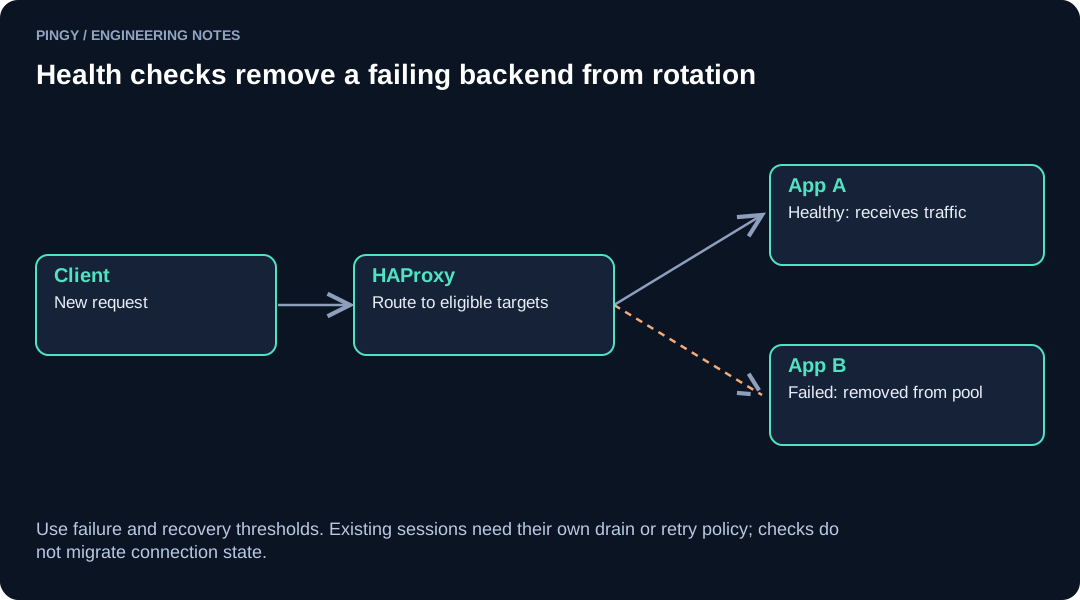
The thresholds leave a detection window
Here, fall 3 requires three consecutive failed checks to mark a running server down. rise 2 requires two consecutive successful checks to restore a down server. Checks continue while a server is down. A user request can fail during the interval before removal.
With timeout check set, the check's connection timeout is the smaller of timeout connect and inter. The additional read timeout comes from timeout check. These settings are documented in the HAProxy 3.2 configuration manual.
Do not turn inter × fall into a promised recovery time. The failure can begin between probes; a refused connection, a quick HTTP 503, and a response that times out take different paths through the test. Measure from the injected fault to the DOWN event, then separately to the first successful client request.
Changing a server's health status also does not repair work already sent to it. Requests can fail after the application has made a change. Before adding HTTP response retries, decide which operations can safely be repeated and how duplicate writes are prevented. Review HAProxy's retry and redispatch controls separately from health-check tuning.
Passive observation is another explicit choice: configure observe layer4 or observe layer7, an error threshold, and an on-error action. A connection error alone should not be described as automatically marking a server down in every HAProxy configuration.
Test a failing check while requests continue
Run this on the local lab or a staging pool with enough spare capacity. Arrange a test-only way to change web1's /healthz response without stopping its HTTP listener. Do not expose that control on the public application.
First, confirm both backends are UP. With socat installed, the private Runtime API socket provides CSV statistics:
printf 'show stat\n' | sudo socat stdio /run/haproxy/admin.sock
Find the rows whose pxname is web_servers and whose svname is web1 or web2. Read the column names from the header instead of relying on fixed column numbers. Record status, check_status, check_code, check_duration, and scur. The show stat reference defines these fields.
Send a bounded series of fresh requests through the frontend:
for n in 1 2 3 4 5 6 7 8 9 10; do
    curl -sS --max-time 3 -H 'Host: app.example.test' \
        -w 'HTTP %{http_code}\n' http://127.0.0.1:8088/
    sleep 1
done
Make /healthz on web1 return 503, while leaving web2 healthy. Record when you changed it. Watch the probe log and statistics until web1 becomes DOWN. Continue requests and verify that new responses identify web2. Restore web1's readiness response to 200, then watch it pass two checks and receive requests again.
These were the observed results in the isolated lab using the configuration above:
| Test | Evidence to look for |
|---|---|
| Both readiness endpoints return 200 | Both servers are UP; repeated requests reach both instances. |
| web1 returns 503 | Three failed probes precede DOWN; check_status is L7STS; new requests reach web2. |
| web1 recovers to 200 | Two successful probes precede UP. |
| web1 returns 302 | The exact-200 expectation rejects it; it becomes DOWN. |
| web1 delays its health response for three seconds | The one-second read timeout fails the check with L7TOUT; repeated failures remove it. |
| Both servers fail their checks | With this configuration and no backup, new requests receive HTTP 503. |
The table is a functional test, not a throughput benchmark or a guarantee of interruption-free failover. Repeat with your application's ordinary requests and its longer operations. Keep client results alongside HAProxy's logs so a healthy backend status cannot hide an application error.
Maintenance commands test a different path
disable server puts a server in maintenance mode and suspends its health checks. The statistics show MAINT. It is useful for an operator action, but it does not exercise the automatic failure threshold. See the disable server reference.
For a planned deployment, drain first:
printf 'set server web_servers/web1 state drain\n' | \
    sudo socat stdio /run/haproxy/admin.sock
Drain keeps health checks running and removes the server from ordinary load balancing. Persistence can still direct traffic to a draining server, and existing work needs time to finish. Inspect active sessions and application activity before stopping the process. The Runtime API state controls distinguish ready, drain, and maint.
After the deployment and readiness checks, restore normal eligibility:
printf 'set server web_servers/web1 state ready\n' | \
    sudo socat stdio /run/haproxy/admin.sock
Treat these as runtime operations. Make any lasting maintenance policy part of your deployment procedure, including what a reload or restart should do.
Plan for an empty pool
A backup server is optional. Adding backup to a server line makes it eligible when normal servers are unavailable. With multiple backups, HAProxy normally uses the first operational one; option allbackups uses the available backup pool according to the configured balancing algorithm. The configuration manual describes the selection rules.
A backup needs a defined job and enough capacity for it. If it serves a maintenance response, make sure its health endpoint can pass the configured readiness check while the customer-facing response still reports the intended failure status. A fallback that shares the failed dependency may offer no recovery at all.
The lab covers backend selection behind one HAProxy process. Test the public hostname separately from outside that network. Keep evidence for DNS resolution, TLS, and an ordinary application response. Pingy's response and latency checks can help observe that public path; an internal UP state alone cannot establish that users can reach it.