
A 60-second DNS TTL does not promise recovery in 60 seconds. Your provider must detect the failure and change its answers. Resolvers may still have the old answer, and clients need to reconnect. Measure those stages separately before setting a recovery target.
This guide covers switching an existing hostname between endpoints. It includes a planned cutover procedure and commands for finding where a change has stalled.
What TTL actually controls
A DNS answer's time to live, or TTL, tells a resolver how long it can normally reuse that answer before refreshing it. Updating an authoritative record does not erase copies already held by resolvers. The TTL remaining in each cache depends on when that resolver obtained the answer. RFC 1034 describes this caching model.
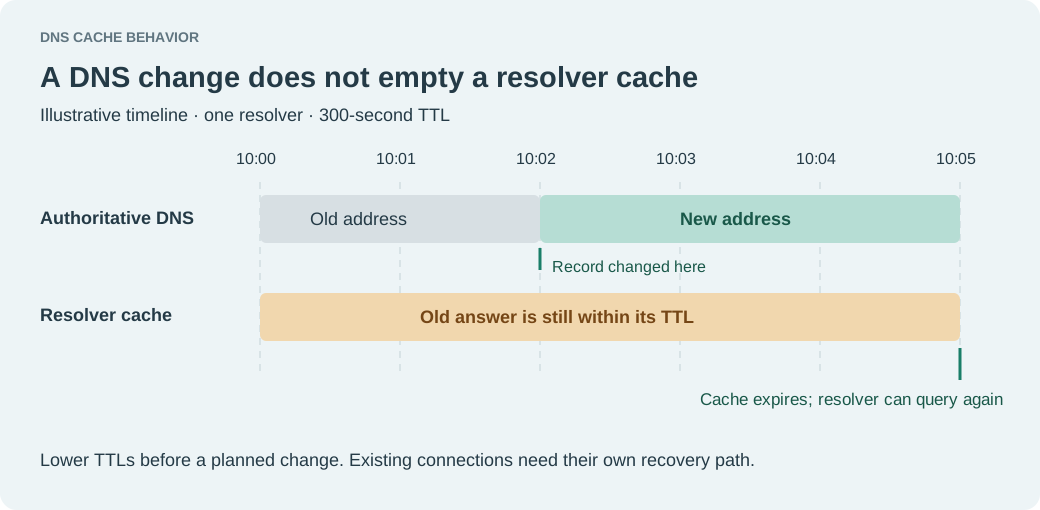
In the illustrative timeline below, a resolver gets an address at 10:00 with a 300-second TTL. You change the authoritative answer at 10:02. The resolver can still return the old address until 10:05. A resolver with no cached answer can obtain the new address earlier.
Expiration also does not force an application to make a DNS query at that instant. An idle client may ask later; a client with an open connection may keep using it.
Measure the whole recovery path
For a failover drill, record the time of the failure, the health-state change, the changed authoritative answer and the first successful application request through each test client. These measurements tell you which stage needs work.
| Stage | Evidence to collect |
|---|---|
| Failure detection | When the provider marks the primary unhealthy |
| DNS selection | When an authoritative query returns the standby |
| Cache refresh | When each tested resolver returns the standby |
| Client recovery | When a real request succeeds on the standby |
The stages can overlap. A resolver might refresh just before the DNS provider changes its answer and receive a fresh copy of the old address. Another resolver might have no cached entry. Adding one probe interval to one TTL is therefore too crude to establish a recovery guarantee.
Route 53 runs endpoint checks periodically, independently of incoming DNS queries. Its routing policy uses the resulting health state when selecting an answer; it does not wait for remote resolver caches to expire. AWS documents that sequence.
Route 53 also combines observations from multiple health checkers. The interval and consecutive-failure threshold matter, but they do not describe a single globally synchronized timer. AWS's health-check documentation explains the aggregation. Use the drill's observed times when planning your own service recovery.
Choose a TTL for the record you will change
AWS recommends 60 seconds or less for non-alias Route 53 records associated with health checks. That is a provider recommendation, not a universal minimum. Shorter TTLs trade more frequent DNS lookups for fresher answers. Check your provider's supported values and query costs. Route 53 failover record settings
For a planned change, inspect the current TTL before choosing a waiting period. If an address record has a 3,600-second TTL, reduce it ahead of the cutover and allow the old value to age out. Lowering it at the moment of failure cannot shorten an answer already cached for an hour. AWS's cached-record troubleshooting guide describes why the old TTL still applies.
Check both A and AAAA records. Moving IPv4 traffic while leaving an IPv6 address on the failed endpoint gives different clients different results.
A CNAME and its target's address records are separate cached data. If you change which hostname the CNAME points to, the CNAME's TTL matters. If the target keeps its name but changes addresses, inspect those address TTLs. A short TTL on one part of the chain does not shorten the others. Managed alias records can have provider-specific TTL behavior; read the documentation for that target rather than treating an alias as an ordinary CNAME. RFC 1034 on aliases
Two cache behaviors that can surprise you
A missing name can stay missing
If a resolver queries a hostname before you create it, it can cache the negative answer. For authoritative NXDOMAIN and NODATA responses carrying an SOA record, the negative cache TTL comes from the smaller of the SOA record's TTL and its MINIMUM field. The MINIMUM field alone is not enough to determine it. RFC 2308, sections 3 and 5
Create and verify standby names before the drill. Change the existing record in place where your provider supports it; deleting and recreating a name can expose a gap that gets cached.
Expired data can still be served
Resolvers may use serve-stale behavior when they cannot refresh expired data from authoritative DNS. RFC 8767 permits that fallback to keep name resolution working during DNS failures. It can also mean an old endpoint remains visible beyond its original TTL. RFC 8767
Distinguish an application outage from a failure to reach authoritative DNS. Lowering an application record's TTL cannot repair an unreachable nameserver.
Check the authority, the resolver and the application
The commands below are templates. Replace the example hostname, authoritative nameserver and standby address with your own. The documentation address 203.0.113.20 is not a working standby.
First, query each authoritative nameserver listed for the zone. Keep the response header so you can check the status and the aa flag, which marks an authoritative answer.
dig @ns1.example.net app.example.com A \
  +norecurse +noall +comments +answer +authority
Repeat for AAAA, and inspect any CNAME returned. A cross-zone CNAME target may need a separate query to its own authoritative servers. If authorities disagree, investigate the provider's change status or zone distribution before blaming recursive caches.
Next, query a recursive resolver. These examples use two public resolvers; also test the resolver used by an affected client.
dig @1.1.1.1 app.example.com A +noall +comments +answer
dig @8.8.8.8 app.example.com A +noall +comments +answer
dig app.example.com AAAA +noall +comments +answer
In an answer row, the number between the name and IN is the TTL in seconds. Two public resolver answers are samples, not evidence that every client has switched. A browser using its own secure DNS service may follow a different path from command-line dig. The options above are documented in the BIND 9.20 dig manual.
Test the standby over HTTPS before changing DNS:
curl --resolve app.example.com:443:203.0.113.20 \
  --connect-timeout 5 --max-time 15 \
  -sS -o /dev/null -w 'HTTP %{http_code}\n' \
  https://app.example.com/health
Use a real, read-only health path. --resolve pins that hostname and port to the supplied address while retaining the hostname for HTTP, TLS SNI and certificate verification. Do not add -k; a certificate failure is something the cutover must fix. If you use an HTTP proxy, confirm that the test actually reaches the intended standby. curl's name-resolution guide
A successful pinned request verifies that endpoint from your test location. Run the same request without --resolve to exercise normal name resolution. Neither request proves that an authenticated workflow or a database write will succeed.
Run a planned cutover and a separate failure drill
For this hypothetical example, the existing A record has a 3,600-second TTL and the tested failover design uses 60 seconds.
- Verify the standby's certificate, application behavior and required data. Check any IPv6 endpoint too. Record the current DNS values so you can restore them.
- Lower the TTL to 60. Confirm the authoritative servers have the new TTL, then allow at least the old 3,600-second cache lifetime to pass before relying on the lower value. Keep the old endpoint available during the transition where possible.
- Change the address or perform the provider's controlled failover. Record authoritative and recursive answers alongside actual application requests. Include an existing client session as well as a fresh connection.
- Keep watching requests and application errors before retiring the old endpoint. Restore a higher TTL only when it still meets the recovery target for an unplanned failure.
A successful manual cutover tests only part of automatic failover. In a separate controlled drill, make the primary health check fail and verify that the DNS policy selects the standby. Record what happens when both endpoints are unhealthy; consult the exact routing policy instead of assuming it will stop returning addresses.
Test recovery back to the primary as well. Check data consistency before returning writes, and give clients time to leave the standby. DNS does not reconcile application state.
For the DNS checks, Pingy's DNS report guide explains how to read authoritative-server findings. Keep that evidence alongside application tests. A changed DNS answer is one timestamp in the drill; the recovery time ends when the user operation works again.